
欢迎使用 POE2 MapGuiderWelcome to POE2 MapGuider
POE2 MapGuider 是一款专为《流放之路 2》玩家打造的辅助工具,支持横版(HB)与竖版(VB)两种布局,可自动显示地图攻略、角色信息、地图耗时与刷图时间线,减少来回切换窗口。同时支持在线排行榜、角色认证、地图点评与刷图统计。
POE2 MapGuider is a companion tool for Path of Exile 2 players. It supports both Horizontal (HB) and Vertical (VB) layouts, automatically displaying map guides, character info, map timing, and map timeline to reduce window switching. It also features an online leaderboard, character verification, map reviews, and map run statistics.
安全提示:本工具不会修改游戏内存,仅读取日志文件和公开 API,安全可靠。
Safe to Use: This tool does not modify game memory. It only reads log files and public APIs, making it completely safe.
版本选择:竖版(VB)适合并排查看攻略;横版(HB)适合全屏游戏时悬浮查看信息。按你的游戏习惯任选即可。
Version Selection: Vertical (VB) is ideal for viewing guides side-by-side; Horizontal (HB) is better for overlaying info while gaming fullscreen. Choose based on your play style.
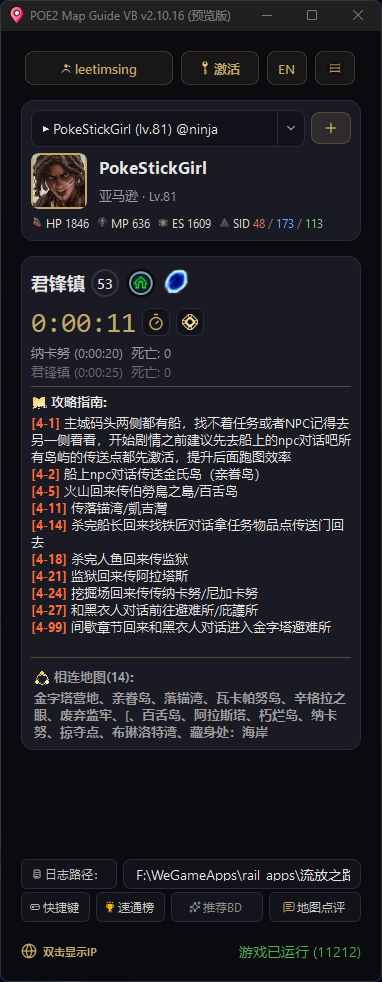
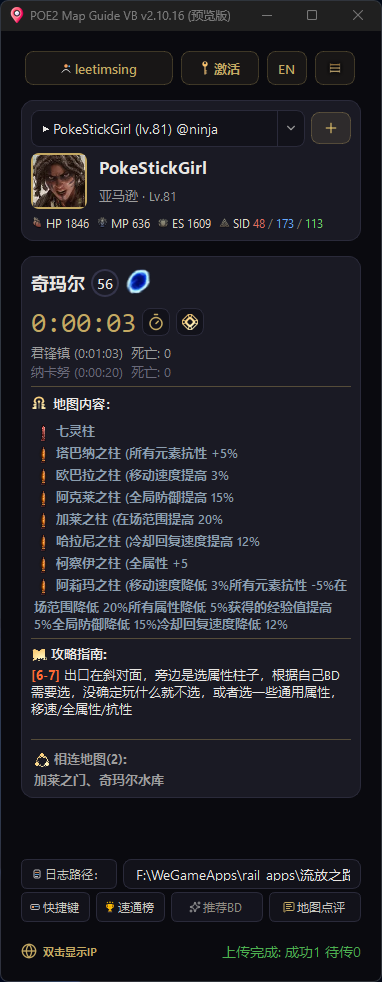
图 1.1 — POE2 MapGuider VB 竖版主界面(左右两张)Fig 1.1 — POE2 MapGuider VB main interface, shown in two screenshots
横版支持(HB 悬浮窗)Horizontal Mode (HB Overlay)
横版模式更适合边刷图边看信息:窗口置顶、紧凑显示地图/计时/攻略,并尽量不遮挡游戏操作。
HB mode is ideal for viewing info while mapping: always-on-top window, compact display of map/timer/guide, designed to not obstruct gameplay.
紧凑信息栏Compact Info Bar
同屏展示:当前地图、计时器、BOSS 提示、攻略文字、区域内容、相连地图与角色信息。
Shows on screen: current map, timer, boss tips, guide text, area content, connected maps, and character info.
鼠标穿透Click-Through
默认鼠标穿透不影响游戏操作;移到攻略区域或状态栏链接时可交互。
Default click-through doesn't affect gameplay; interactive when hovering over guide area or status bar links.
左侧按钮栏Left Button Bar
提供拖拽、日志路径、绑定角色、地图点评、推荐 BD、反馈、更新与关闭等快捷操作。
Quick actions: drag, log path, bind character, map reviews, build recommendation, feedback, update, close, and more.
隐私友好Privacy Friendly
默认用"."隐藏完整 IP/归属地信息,可通过左侧"IP"按钮随时切换显示。
IP/region hidden by default with "."; toggle display anytime via the "IP" button on the left.
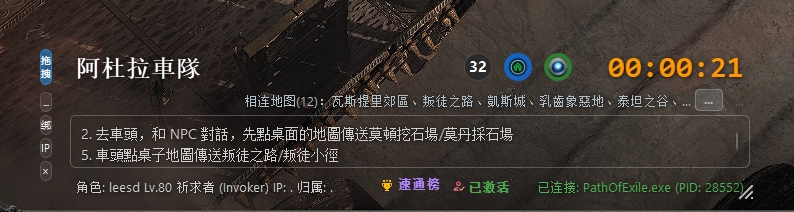
图 1.2 — 横版(HB)主界面Fig 1.2 — HB mode main interface
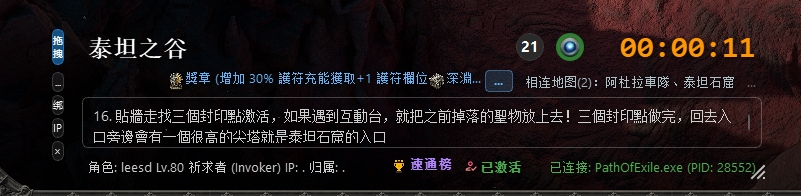
图 1.3 — 横版左侧功能按钮Fig 1.3 — HB left-side action buttons
区域内容与相连地图:能够显示当前区域包含的关键内容(如试炼、神坛等)以及所有相连的出口地图。若信息过长,会出现"..."按钮,点击可查看完整详情弹窗。
Area Content & Connected Maps: Shows key content in current area (trials, shrines, etc.) and all connected exit maps. If info is long, a "..." button appears for full details popup.
竖版路线图:竖版支持路线图查看,路线较多时可左右切换,跟图更直观。
VB Route Map: Vertical mode supports route map viewing with left/right navigation when there are many routes.
安装与运行Installation & Setup
支持 Windows 10/11 系统,提供 exe 免安装版本和 Python 源码运行两种方式。
Supports Windows 10/11. Available as a standalone exe or Python source.
方式一:exe 直接运行(推荐)Option 1: Run exe Directly (Recommended)
- 前往 下载入口 获取当前可用的最新版 zip 压缩包。
- Use the download link to get the current available zip package.
- 解压到任意目录,双击
POE2MapGuider_VB.exe或POE2MapGuider_HB.exe即可。 - Extract to any folder, then double-click
POE2MapGuider_VB.exeorPOE2MapGuider_HB.exe.
解压后目录结构Folder Structure After Extraction
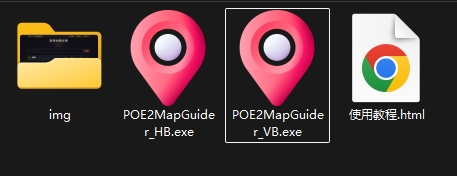
图 1.4 — 解压后的文件夹内容Fig 1.4 — Extracted folder contents
仪表盘概览Dashboard Overview
启动后,您将看到采用深色金色主题设计的控制台,核心功能一目了然。
On startup, you'll see a dark gold-themed dashboard with core features at a glance.
网络监控Network Monitor
显示当前公网 IP 及归属地信息,帮助判断网络线路状态。
Displays your public IP and region to help diagnose network routing.
自动计时Auto Timer
进出地图自动开始/停止计时,精准统计刷图效率。
Automatically starts/stops timer when entering/leaving maps for precise efficiency tracking.
死亡 / 升级检测Death / Level Detection
自动检测角色死亡与升级事件,支持国服/国际服日志格式,数据同步上传排行榜。
Auto-detects death and level-up events. Supports CN/International server log formats and syncs to leaderboard.
自动上传Auto Upload
刷图记录自动上传至 PSL 排行榜,支持断线重传与队列持久化。
Map runs auto-upload to PSL leaderboard with offline retry and queue persistence.
PSL 排行榜:横版状态栏提供 速通榜 快捷入口,支持查看全球剧情竞速排行与个人刷图统计。
PSL Leaderboard: HB mode status bar provides quick access to the Speedrun Leaderboard for global rankings and personal stats.
PSL 排行榜预览PSL Leaderboard Preview
访问 psl.lss.lol 查看速通榜、进度榜与个人刷图统计。
Visit psl.lss.lol for speedrun rankings, progress boards, and personal map stats.
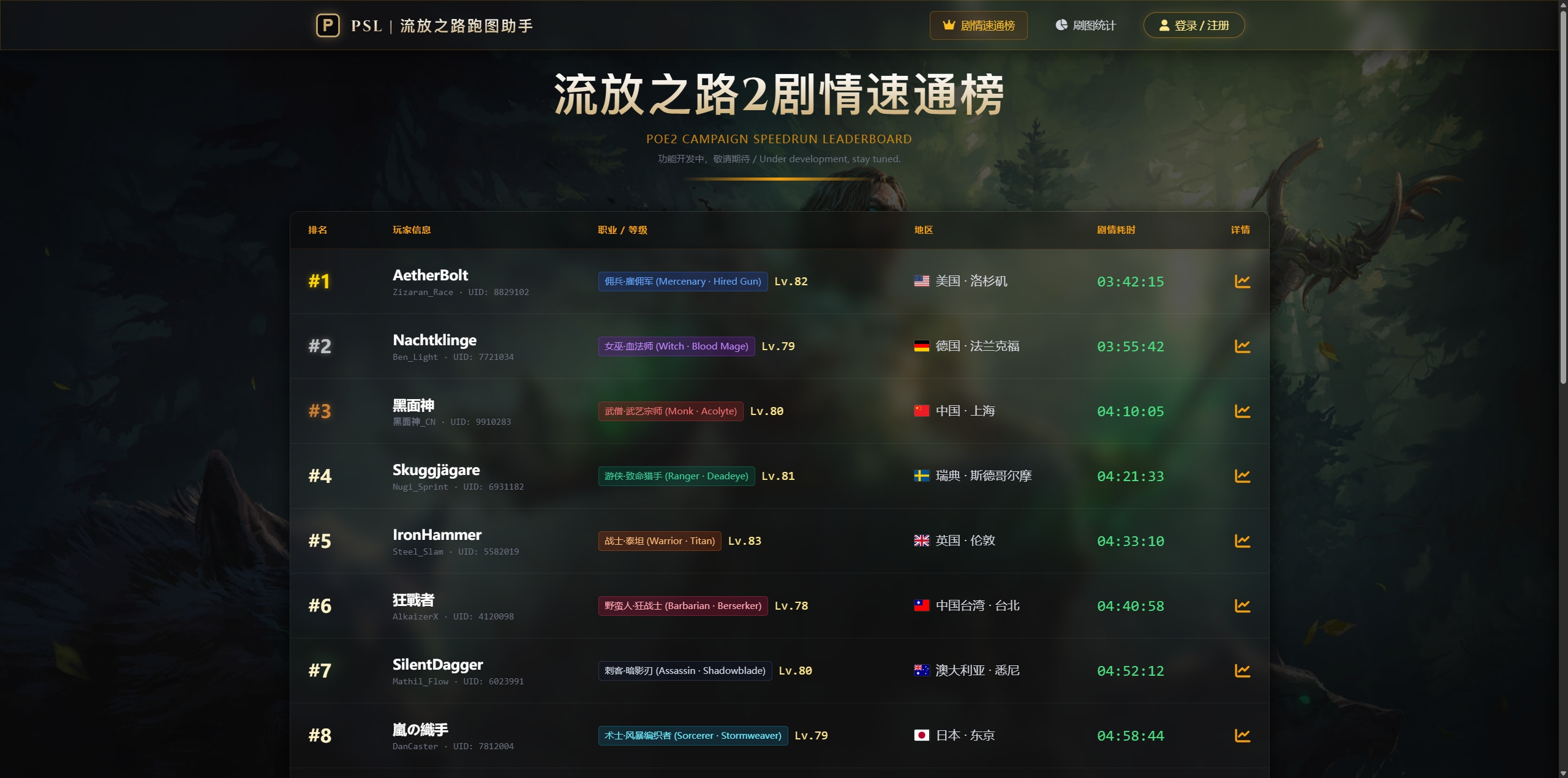
图 1.5 — 剧情速通榜Fig 1.5 — Story Speedrun Leaderboard
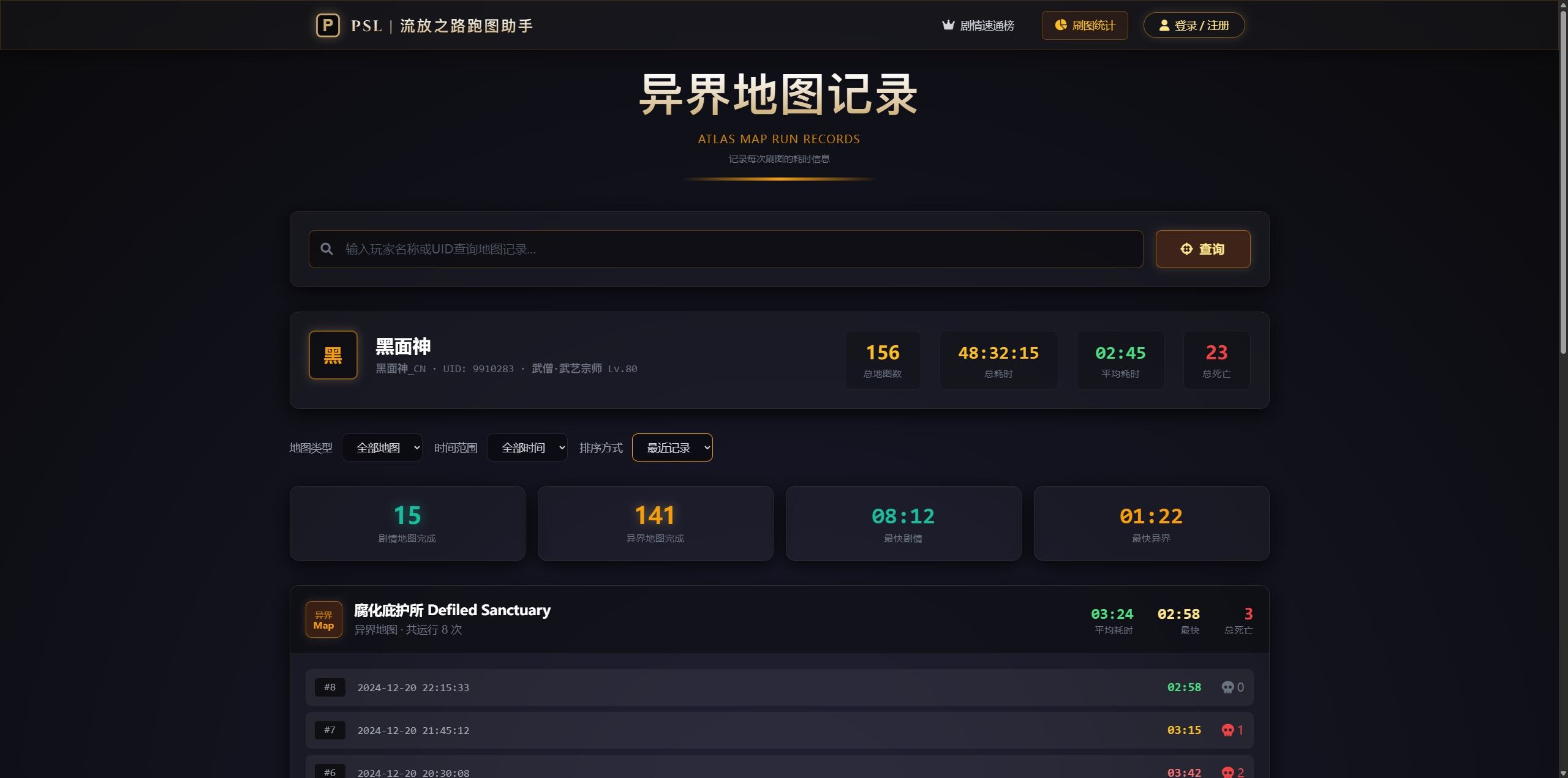
图 1.6 — 刷图统计页面Fig 1.6 — Map Statistics Page
角色信息同步Character Sync
支持 WeGame(国服)与 poe.ninja(国际服)角色链接绑定,粘贴后即可快速同步角色信息,包括等级、职业、生命/魔力/护盾及力敏智六维属性。绑定后数据会自动上传至排行榜。
Supports WeGame (CN server) and poe.ninja (International server) character linking. Paste the URL to sync character info including level, class, HP/MP/ES, and STR/DEX/INT. Data auto-uploads to the leaderboard after binding.
方式一:WeGame 角色绑定(国服)Option 1: WeGame Binding (CN Server)
- 打开浏览器,访问 WeGame 流放之路2 助手 - 角色页面。
- Open browser and visit WeGame POE2 Helper - Character Page.
- 登录你的 WeGame 账号,在角色列表中找到要绑定的角色。
- Log in to your WeGame account and find the character you want to bind.
- 点击角色进入详情页,复制浏览器地址栏中的完整 URL。
- Click the character to view details, then copy the full URL from the address bar.
- 回到 POE2 MapGuider,将链接粘贴到角色输入框中,点击"刷新"即可完成绑定。
- Return to POE2 MapGuider, paste the link into the character input box, and click "Refresh" to complete binding.
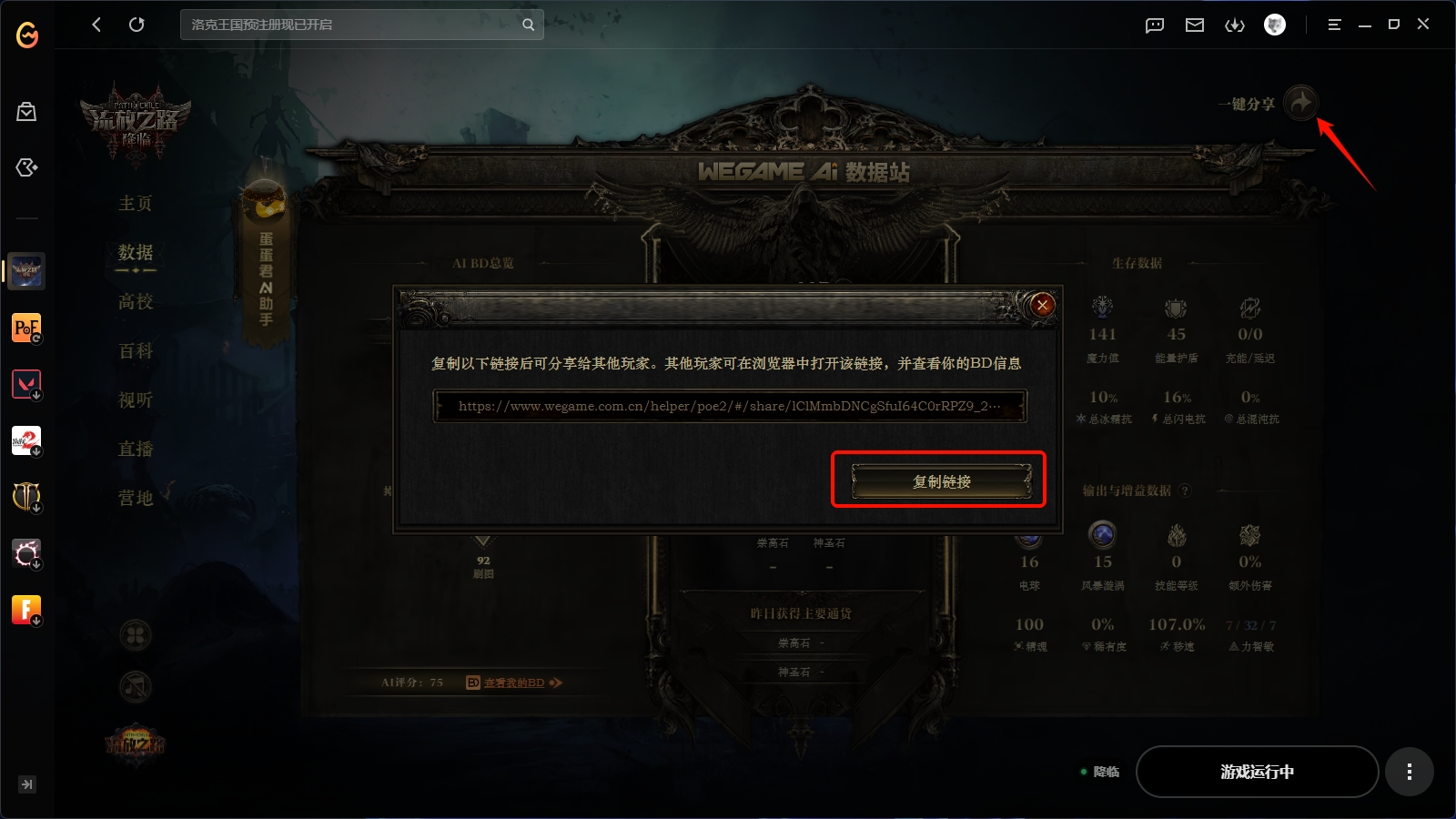
图 1.7a — WeGame 助手角色页面,复制地址栏 URL 即可Fig 1.7a — WeGame Helper character page, copy the URL from address bar
方式二:poe.ninja 角色绑定(国际服)Option 2: poe.ninja Binding (International Server)
- 打开浏览器,访问 poe.ninja 账号页面,登录你的 GGG 账号。
- Open browser and visit poe.ninja account page, log in with your GGG account.
- 在角色列表中找到你要绑定的角色,点击角色名进入详情页。
- Find your character in the list and click the name to view details.
- 复制浏览器地址栏中的完整 URL(格式类似
https://poe.ninja/poe2/builds/char/账号名/角色名)。 - Copy the full URL from the address bar (format:
https://poe.ninja/poe2/builds/char/account/charname). - 回到 POE2 MapGuider,将链接粘贴到角色输入框中,点击"刷新"即可完成绑定。
- Return to POE2 MapGuider, paste the link into the character input box, and click "Refresh" to complete binding.
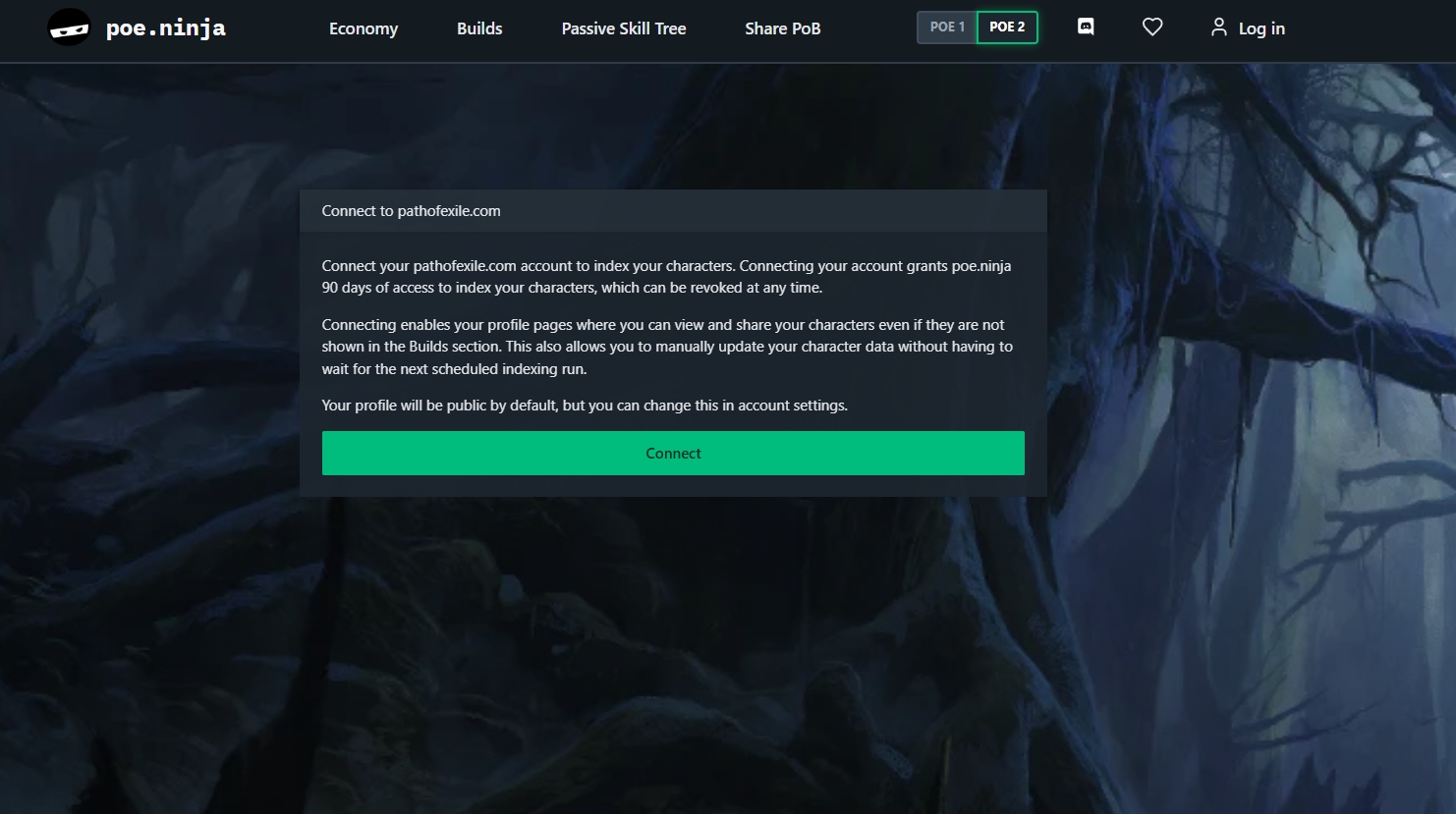
步骤 1 — 访问 poe.ninja 账号页面Step 1 — Visit poe.ninja account page
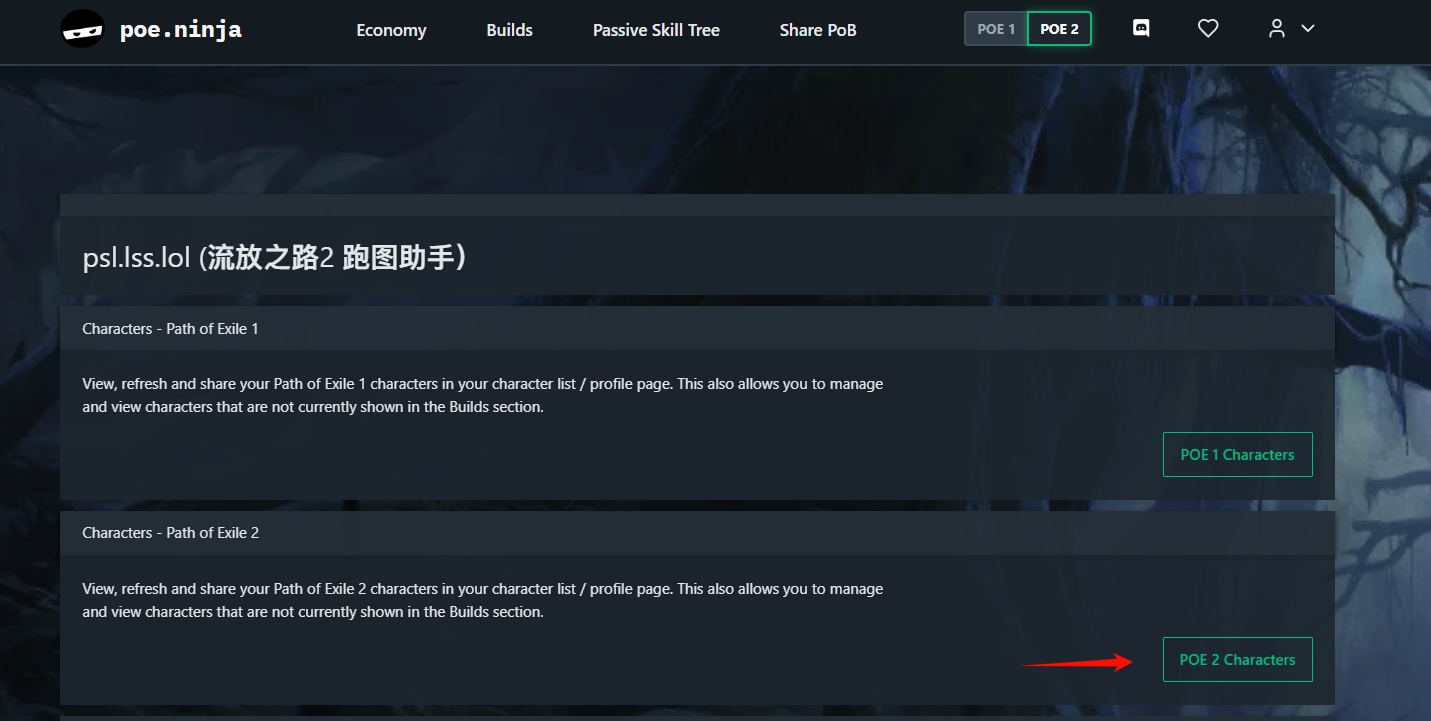
步骤 2 — 选择要绑定的角色Step 2 — Select character to bind
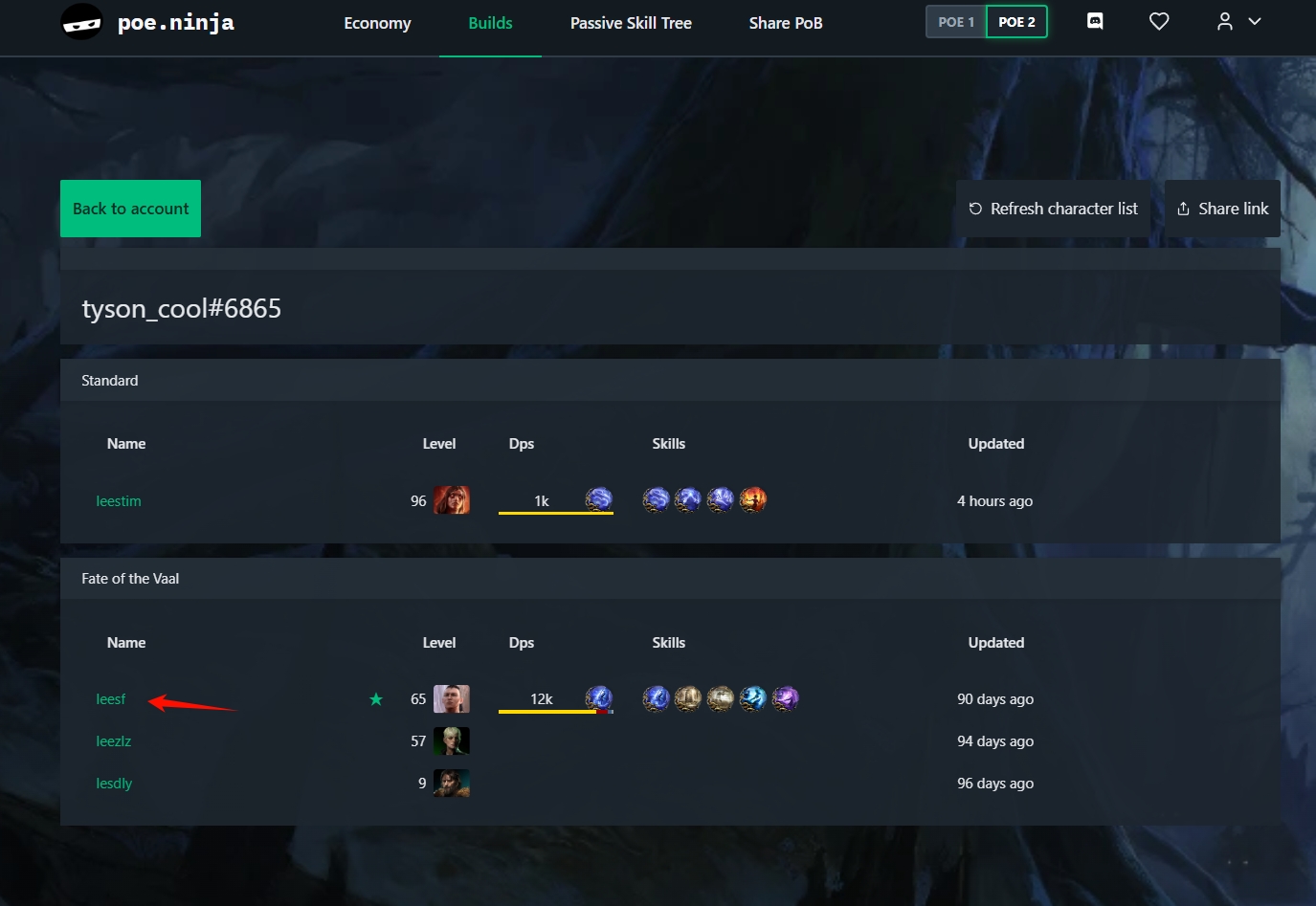
步骤 3 — 进入角色详情页Step 3 — Enter character details
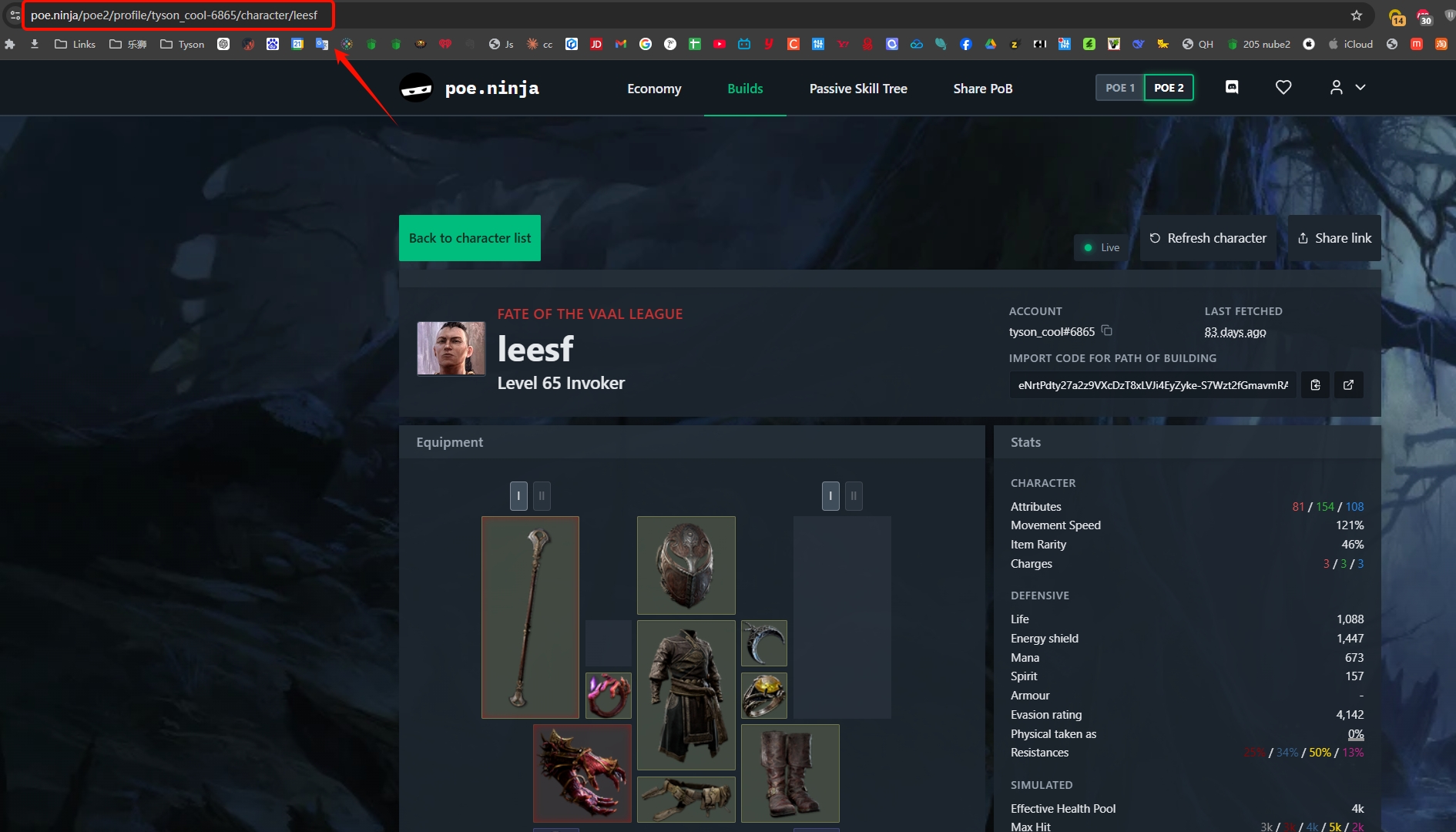
步骤 4 — 复制地址栏 URL 粘贴到客户端Step 4 — Copy URL and paste into client
绑定后效果After Binding
绑定成功后,客户端会自动获取并显示角色的职业、等级、六维属性等信息。同时角色数据会同步到 PSL 排行榜,你可以在 角色档案 和 刷图统计 页面查看。
After binding, the client will automatically fetch and display your character's class, level, and six attributes. Data syncs to the PSL leaderboard — view it on Profile and Map Stats pages.
角色认证:当客户端检测到角色死亡或升级事件时,会自动完成角色认证(角色名旁显示绿色认证徽标),防止冒用他人角色。认证完全自动,无需手动操作。
Character Verification: When the client detects death or level-up events, it automatically verifies your character (green badge next to name), preventing impersonation. Verification is fully automatic.
区服自动识别:绑定 WeGame 链接会自动标记为国服(CN),绑定 poe.ninja 链接会自动标记为国际服(INTL),无需手动选择。
Auto Server Detection: WeGame links are automatically marked as CN server, poe.ninja links as INTL server — no manual selection needed.
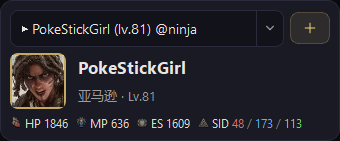
图 1.7b — 角色信息面板(含六维属性与认证状态)Fig 1.7b — Character info panel with attributes and verification status
地图统计Map Statistics
工具会自动读取游戏日志(Client.txt),识别您进入的地图区域并显示攻略。
The tool automatically reads the game log (Client.txt) to identify map areas you enter and display guides.
注意:请确保 WeGame 的"辅助功能"已开启,否则游戏可能不会生成日志文件,导致无法识别地图。
Note: Make sure WeGame's "Helper Features" are enabled, otherwise the game may not generate log files and map detection will fail.
- 1 自动识别:进入地图时自动显示地图名称。 Auto Detection: Map name displays automatically when you enter.
- 2 地图攻略:自动显示当前地图攻略、BOSS 与奖励信息,减少遗漏精魂与天赋点。 Map Guide: Automatically shows current map guide, boss info, and rewards to help you not miss spirits and skill points.
- 3 耗时统计:离开地图或返回藏身处时,自动结算该次刷图用时,并显示最近两次地图记录。 Time Tracking: Automatically calculates run time when leaving map or returning to hideout, showing last 2 map records.
- 4 剧情速通计时:自动检测剧情开始(污流河畔)与通关(金字塔避难所),全程分段计时并上报速通榜。 Story Speedrun Timer: Auto-detects story start (Fetid Mire) and completion (Ziggurat Refuge), timing all segments and reporting to leaderboard.
- 5 刷图时间线:点击计时器旁按钮查看服务器最近记录,包含进入时间、地图名、耗时与死亡数。 Map Timeline: Click the button beside the timer to view recent server records with entry time, map, duration, and deaths.
- 6 地图点评:登录后可为当前地图发布公开或私密点评,公开点评通过审核后展示给其他用户。 Map Reviews: Logged-in users can post public or private reviews for the current map. Public reviews show to others after moderation.
日志路径识别:默认会自动识别日志路径;如果识别失败,手动选择一次 Client.txt 即可继续使用。
Log Path Detection: Log path is auto-detected by default; if detection fails, manually select Client.txt once to continue.
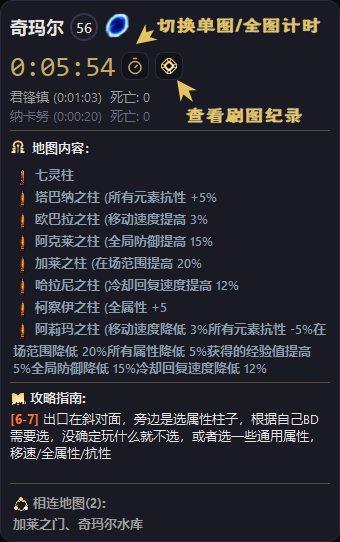
图 1.8 — 地图识别、区域内容与攻略展示Fig 1.8 — Map detection, area content, and guide display
刷图时间线Map Timeline
点击计时器旁的时间线按钮,可以打开当前角色的服务器刷图记录。时间线按进入时间串联最近路线,适合回看剧情推进顺序、检查单张地图耗时,以及定位死亡或卡进度的位置。
Click the timeline button beside the timer to open server-side map records for the current character. The timeline connects recent runs by entry time, making it easier to review story progression, check single-map duration, and locate deaths or progress blockers.
- ◆记录内容:进入时间、地图名、刷图耗时、死亡次数与上传状态。Record fields: entry time, map name, duration, death count, and upload status.
- ◆查看范围:默认展示当前绑定角色的最近记录,登录后可在网页端继续查看更完整的刷图统计。Scope: shows recent records for the bound character by default; after login, the web page can show more complete map statistics.
- ◆使用前提:需要日志路径正常、角色已绑定,并保持网络可用,才能同步到服务器时间线。Requirements: log path must work, a character must be bound, and network access must be available for syncing to the server timeline.
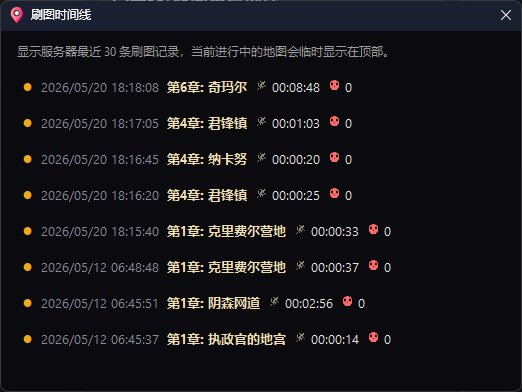
图 1.9 — 刷图时间线窗口Fig 1.9 — Map timeline window
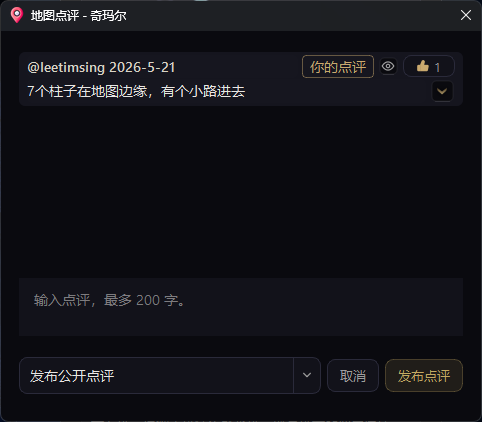
图 1.10 — 地图点评窗口Fig 1.10 — Map review dialog
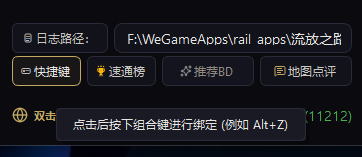
图 1.11 — 快捷键设置Fig 1.11 — Hotkey settings
极简计时器Minimal Story Timer
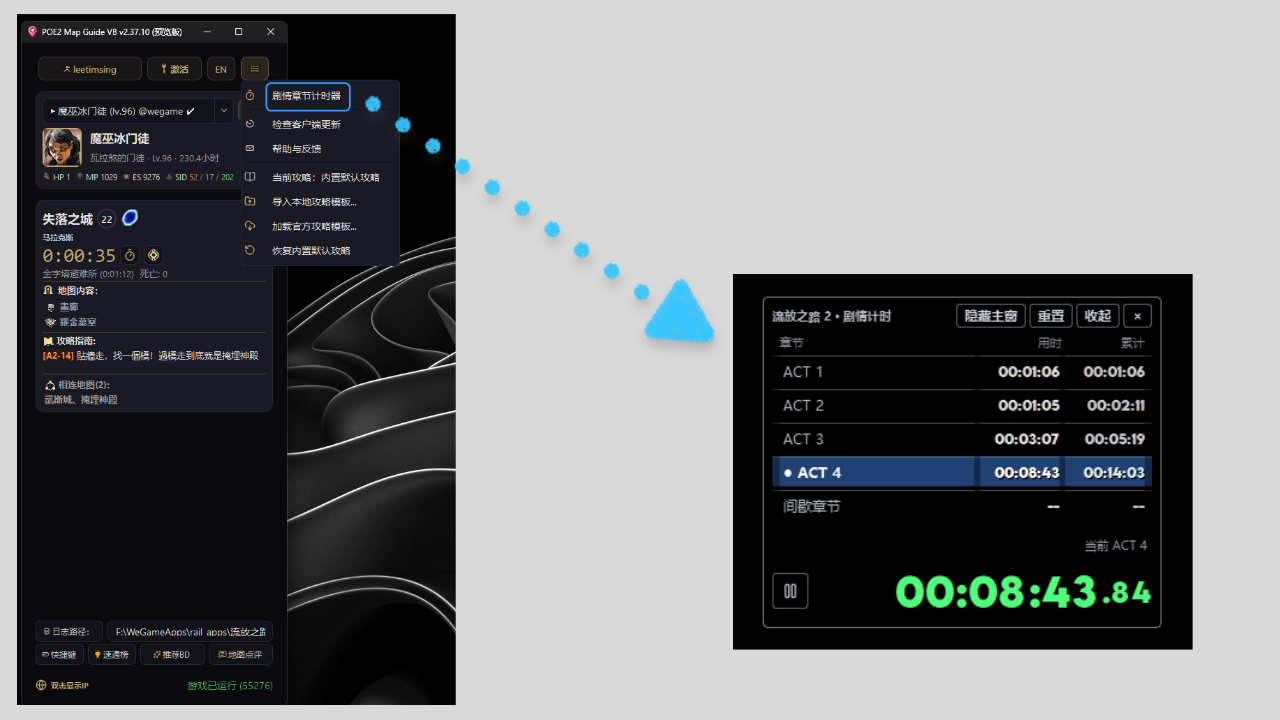
极简计时器会根据进入地图的章节自动记录剧情进度。它是独立的透明悬浮窗,可以与 HB 或 VB 主程序同时显示,不会上传到排行榜。
The minimal timer automatically records story progress from the chapter of each entered area. It is a separate transparent overlay that can stay open with HB or VB and is not uploaded to leaderboards.
- 1在客户端菜单中选择“极简计时器”打开窗口。首次进入可识别的剧情地图后会自动开始;总计时左侧的播放、暂停图标也可手动开始、暂停或继续。Open it from the client menu. Timing starts automatically in recognized story areas; use the play and pause icon beside the total time to start, pause, or resume manually.
- 2首次进入下一章节时,上一章节会自动结算。返回城镇、藏身处或其他非章节区域不会切换章节,当前章节仍会继续累计。The previous chapter is finalized when you first enter the next one. Towns, hideouts, and other non-chapter areas do not switch chapters, so the current chapter continues accumulating.
- 3间歇章节的三个小节会合并累计,直到首次进入“金字塔避难所(The Ziggurat Refuge)”时才统一结算。The three intermission parts share one timer and are finalized only when you first enter The Ziggurat Refuge.
- 4除操作按钮外,可在窗口内任意位置拖动移动;点击大号时间可收起或展开。窗口内可隐藏 / 打开主程序;重置会要求再次确认。游戏退出后计时暂停,离线时间不会计入。Drag from any non-button area to move the overlay and click the large timer to collapse or expand. The overlay can hide / open the main app, and reset requires confirmation. Timing pauses when the game exits, so offline time is excluded.
img/tutorial-chapter-timer.png
图 1.12 — 极简剧情章节计时器Fig 1.12 — Minimal story chapter timer
通关海报Campaign Poster
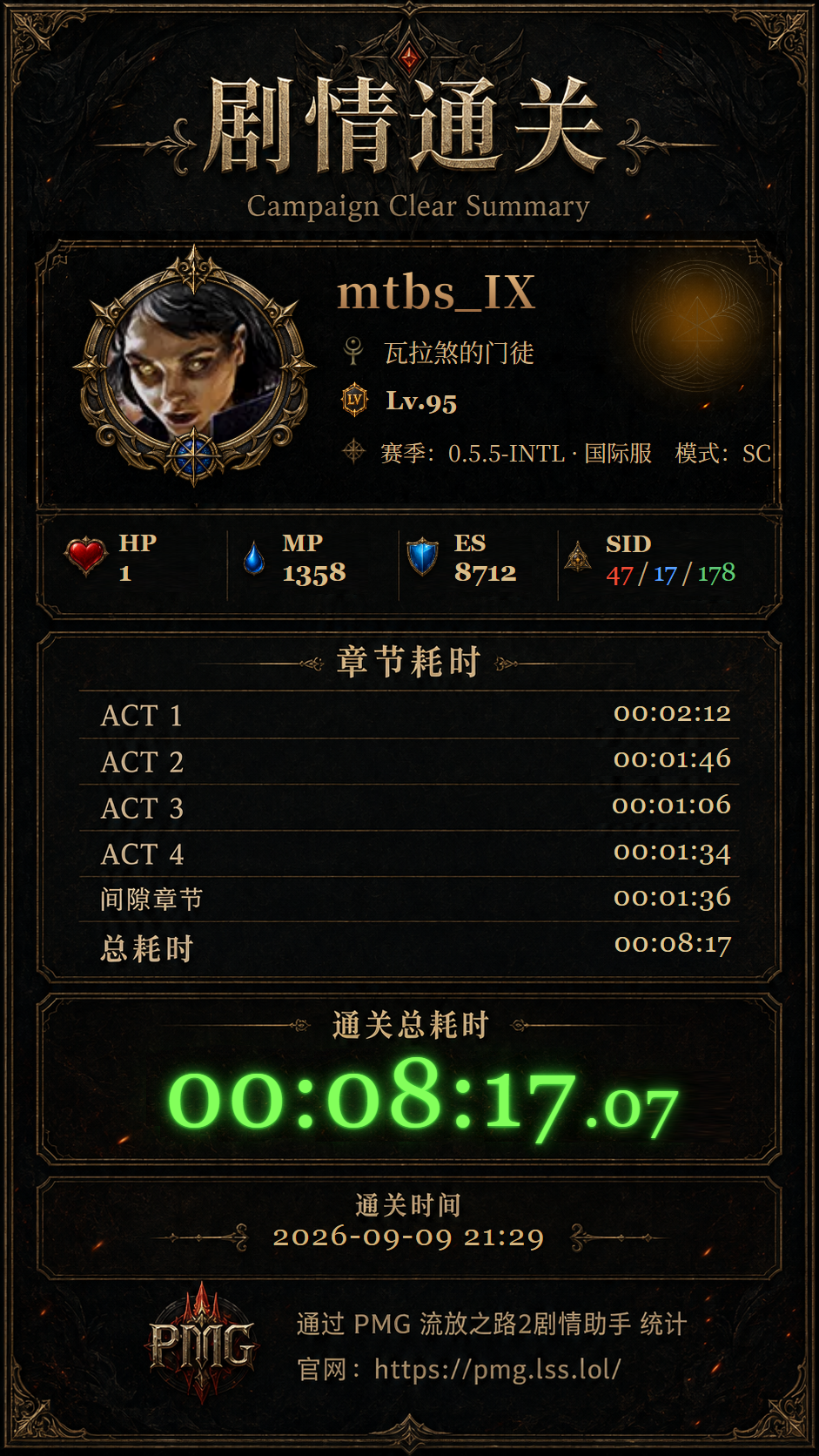
完成剧情后,客户端会根据极简计时器记录的章节耗时,以及当前角色的职业、升华、赛季和属性,生成一张本地通关海报。海报只保存在本机,不会自动公开或上传。
After completing the campaign, the client can create a local poster using chapter times, your character's class, ascendancy, season, and attributes. It is kept on your device and is never published automatically.
- 1先使用“极简计时器”完成剧情。首次进入金字塔避难所后,本次章节耗时会自动保存为通关记录。Complete the campaign with the Minimal Timer running. On your first entry to The Ziggurat Refuge, the chapter times are saved as a completion record.
- 2VB 在“分享平台”右侧点击“通关海报”;HB 在功能菜单中选择“通关海报”。选择一条记录后即可生成预览。In VB, click “Campaign Poster” beside “Share Platform”. In HB, select it from the tools menu. Select a record to generate a preview.
- 3等待海报生成完成后,点击“保存 PNG”选择位置即可下载。预览会自动完整适配窗口,可直接检查角色资料和时间。When generation is complete, click “Save PNG” and choose a location. The preview automatically fits the whole poster inside the window.
先体验:还没有实际通关记录时,可点击“预览示例海报”查看完整效果。它不会写入通关记录,保存时会使用示例文件名。
Try it first: Without a completion record, use “Preview Sample Poster” to see the full result. It never creates a completion record and saves with a sample filename.
img/tutorial-campaign-poster.png
图 1.13 — 通关海报预览与保存Fig 1.13 — Campaign poster preview and save
分享平台Share Platform
分享平台用于浏览 POE2 玩家相关的商业分享和 GM 分享。VB 可在主界面的“分享平台”按钮打开,HB 可在功能菜单中打开。
Share Platform lists POE2 player commercial shares and GM shares. Open it from the “Share Platform” button in VB or from the tools menu in HB.
- 1浏览卡片可查看标题、发布者和目标网站。点击“打开链接”前,客户端会再次提示目标网站地址。Browse cards for their title, publisher, and destination. The client shows the target website again before opening a link.
- 2发现不合适的玩家分享时,可点击“举报”并填写原因。GM 分享不提供举报入口。For unsuitable player shares, use “Report” and provide a reason. GM shares do not have a report action.
- 3发布或管理自己的分享需要先登录,并拥有有效 VIP 权益;未满足条件时,客户端会说明原因。Publishing or managing your own share requires sign-in and active VIP eligibility. The client explains why when eligibility is unavailable.
外链提示:外部链接由发布者提供。打开前请确认网站地址,不要在不信任的网站输入账号、密码或验证码。
External links: Links are supplied by their publisher. Check the address first and do not enter account details, passwords, or verification codes on untrusted websites.

img/tutorial-share-platform.png
图 1.14 — 分享平台Fig 1.14 — Share Platform
BD 推荐Build Recommendations
客户端的“BD 推荐”汇集已发布的职业与升华构筑。选择适合的构筑后,可直接下载到游戏的 BD 规划器目录;登录后还可以点赞和分享自己的构筑。
The client’s “Build Recommendations” collects published class and ascendancy builds. Download a selected build directly to the game’s Build Planner folder. After signing in, you can like builds and share your own.
使用入口:在 HB 或 VB 客户端中点击“推荐 BD”即可打开列表。
Open it: Click “Build Recommendations” in either the HB or VB client.
浏览与筛选Browse and Filter
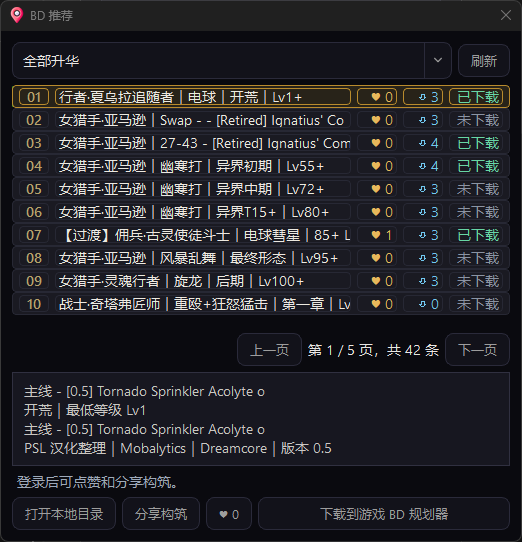
- 1 使用顶部的职业 / 升华下拉框筛选构筑;每个选项后的数字表示该职业或升华已发布的构筑数量。 Use the class / ascendancy selector at the top. The number beside each option is its published build count.
- 2 列表按序号显示,选择一项后会显示构筑名称、适用阶段、最低等级、作者与来源信息。内容较多时可使用页码切换。 Each numbered row shows build details after selection. Use page controls when more results are available.
- 3 爱心和下载图标旁会显示对应数量;下载状态会常驻显示,方便区分已下载和未下载的构筑。 Like and download icons show their counts. The download state stays visible so downloaded and new builds are easy to distinguish.
img/tutorial-bd-recommend-list.png
图 1.15 — BD 推荐列表、职业 / 升华筛选与下载状态Fig 1.15 — Build list, class / ascendancy filter, and download state
下载并在游戏中使用Download and Use in Game
-
1
选中构筑后,点击“下载到游戏 BD 规划器”。客户端会将对应的
.build文件放入游戏可识别的位置。 Select a build and click “Download to Game Build Planner”. The client places the.buildfile where the game can read it. -
2
点击“打开本地目录”可查看已下载文件。默认目录为
Documents\My Games\Path of Exile 2\BuildPlanner。 Click “Open Local Folder” to view downloaded files. The default folder isDocuments\My Games\Path of Exile 2\BuildPlanner. - 3 进入游戏后打开“BD 规划器”,即可从下拉列表选择刚下载的构筑并应用。 Open “Build Planner” in game, then select the downloaded build from its dropdown list.
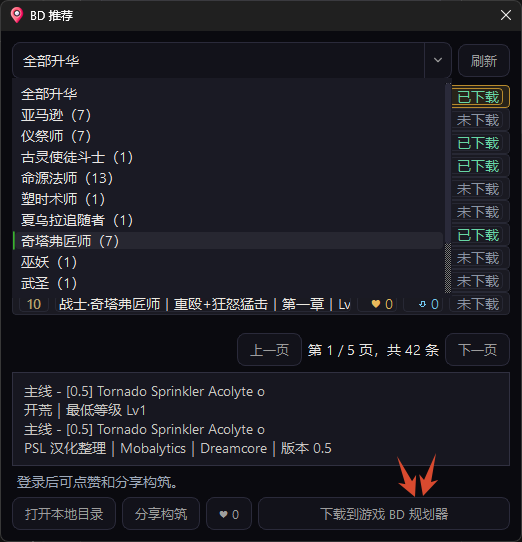
img/tutorial-bd-recommend-download.png
图 1.16 — 下载构筑与打开本地目录Fig 1.16 — Download a build and open the local folder
点赞与分享构筑Like and Share Builds
- 登录后可为喜欢的构筑点赞,再次点击可取消点赞。每个账号对同一构筑只计一次。After signing in, like a build and click again to remove the like. Each account counts once per build.
- 点击“分享构筑”后选择本地
.build文件,并填写升华、适用阶段、主技能 / 流派、最低等级和内容版本。Click “Share Build”, select a local.buildfile, then fill in ascendancy, stage, main skill / archetype, minimum level, and content version. - 中文标题、悬停说明和 BD URL 可按需补充。填写 BD URL 后,其他玩家可在构筑详情中访问原始出处。Chinese title, hover description, and BD URL are optional. When supplied, the source URL is available from the build details.
- 提交后会自动检查必填信息和文件格式。符合要求的分享会直接发布;不符合要求时,请按提示补齐后重新提交。Required information and file format are checked on submission. Valid shares publish directly; otherwise, complete the prompted fields and submit again.
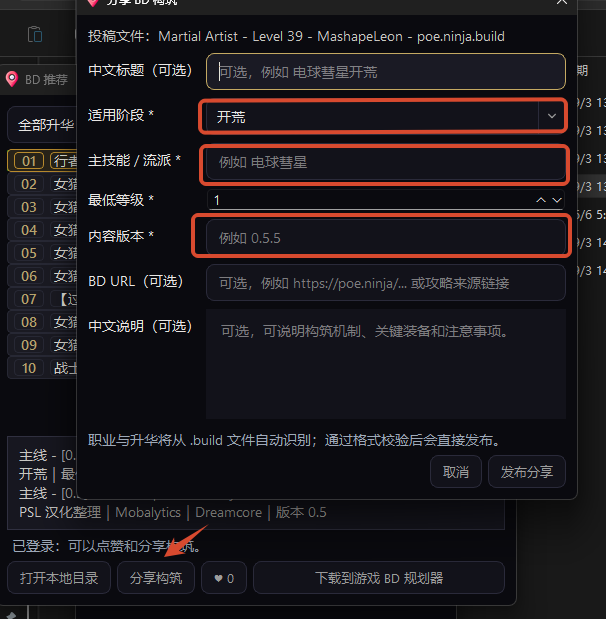
img/tutorial-bd-recommend-share.png
图 1.17 — 分享 BD 构筑Fig 1.17 — Share a build
PSL 排行榜PSL Leaderboard
PSL(POE2 Speedrun Leaderboard)是配套的在线排行榜系统,支持速通榜与进度榜两种视图,数据由客户端自动上传。
PSL (POE2 Speedrun Leaderboard) is the companion online ranking system with speedrun and progress views. Data is auto-uploaded by the client.
功能亮点Highlights
- ◆速通榜:按剧情通关耗时排名,支持国际服/国服/全区筛选Speedrun: Ranked by story completion time, filter by INTL/CN/All
- ◆进度榜:展示所有玩家当前剧情进度(完整通关 / 进行中 / 异界 / 不完整)Progress: Shows all players' current story progress (Complete / In Progress / Endgame / Incomplete)
- ◆角色认证徽标:已认证角色在榜单中显示绿色认证图标Verified Badge: Verified characters show green checkmark in rankings
- ◆国旗与地区:自动显示玩家所在国家/地区旗帜Country Flag: Auto-displays player's country/region flag
- ◆Demo / 真实数据切换:无数据时展示演示数据,有数据后可手动切换Demo/Live Toggle: Shows demo data when empty, switch to live data when available
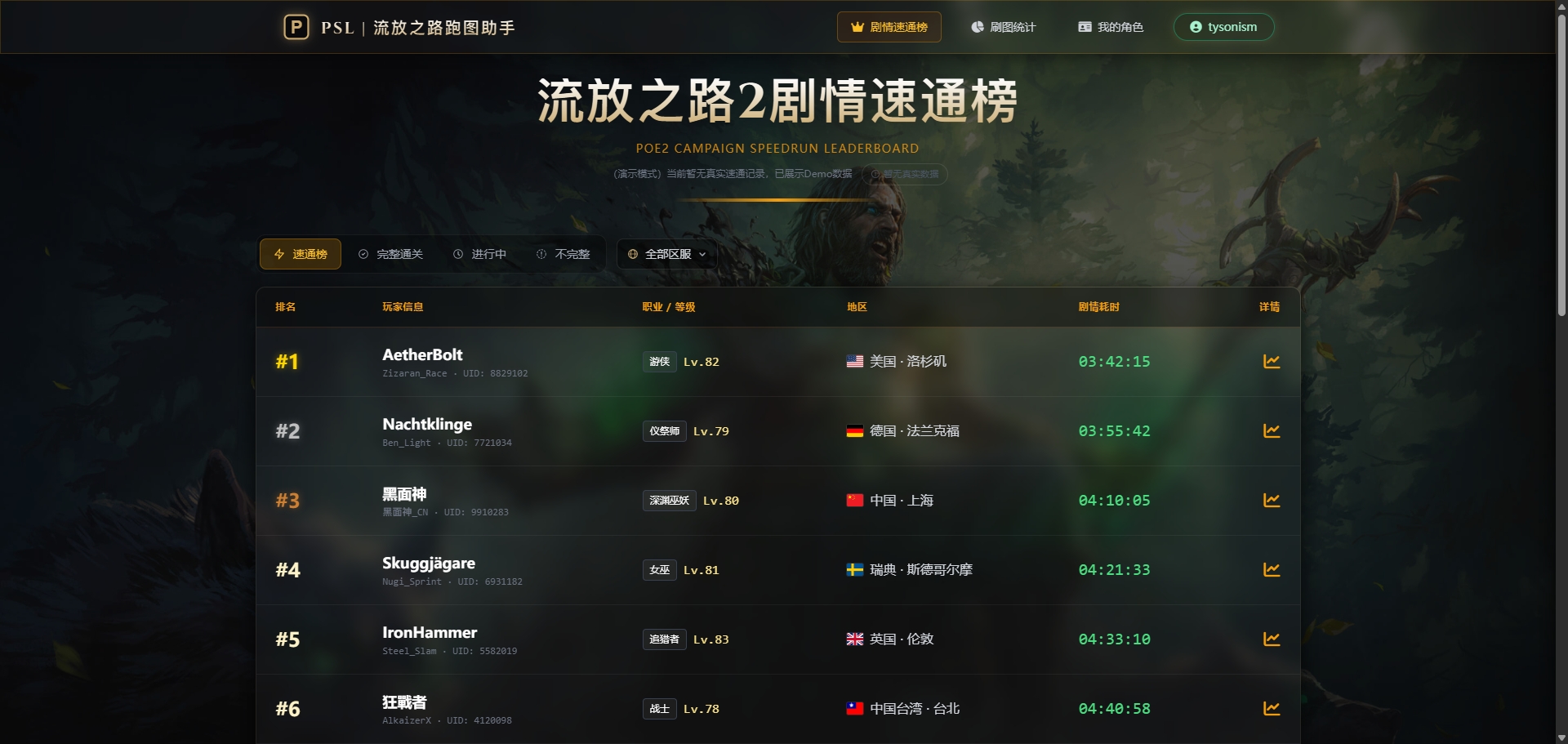
图 2.1 — PSL 速通榜与进度榜标签页Fig 2.1 — PSL Speedrun and Progress tabs
角色档案Profile
访问 psl.lss.lol/profile 查看个人角色列表与汇总统计。
Visit psl.lss.lol/profile to view your character list and summary stats.
- ◆顶部汇总区:总时长 / 总地图数 / 总死亡 / 角色数Top summary: Total time / Total maps / Total deaths / Character count
- ◆角色卡片:职业头像、等级、区服标识、认证状态、剧情进度徽标Character cards: Class avatar, level, server badge, verification status, progress tag
- ◆每张卡片含 4 格统计条:总耗时 / 地图数 / 剧情÷异界 / 死亡Each card has 4 stat bars: Time / Maps / Story:Endgame / Deaths
- ◆点击卡片跳转 maps 页面查看该角色详细刷图记录Click card to jump to maps page for detailed run history
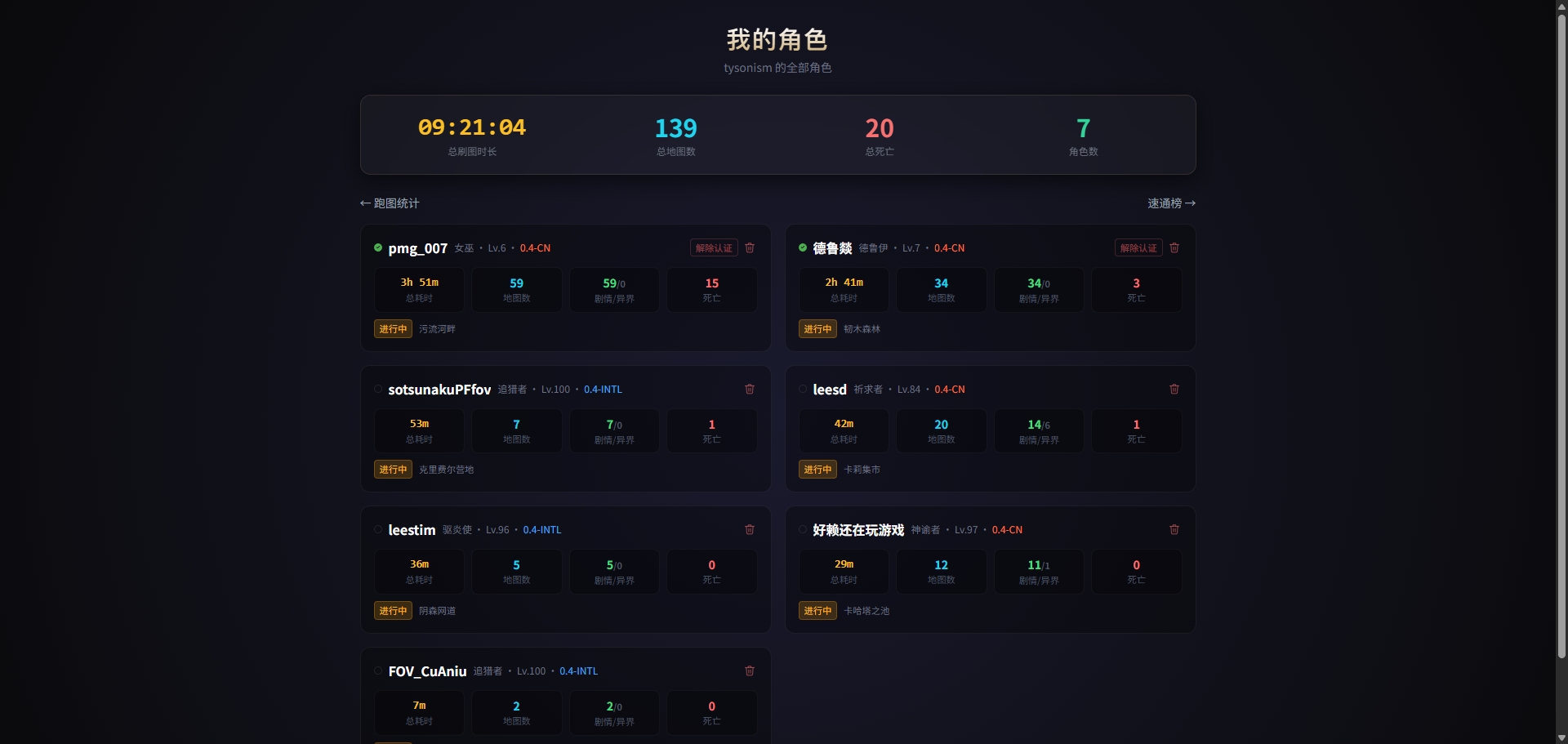
图 2.2 — 角色档案页面Fig 2.2 — Profile page
刷图统计Map Records
访问 psl.lss.lol/maps 查看角色级刷图详情。
Visit psl.lss.lol/maps for character-level map run details.
- ◆角色卡片:头像、职业、等级、区服、认证状态、国旗Character card: Avatar, class, level, server, verification status, country flag
- ◆剧情 / 异界分开统计:总地图数、总耗时、平均耗时、总死亡Story / Endgame stats: Total maps, total time, average time, total deaths
- ◆剧情进度状态标签:完整通关 / 进行中(含当前最远地图名)Story progress tag: Complete / In Progress (with furthest map name)
- ◆地图记录列表:支持分页浏览,每条记录含地图名、耗时、死亡数、时间Map run list: Paginated, each record shows map name, time, deaths, timestamp
- ◆刷图时间线:按进入时间展示历史路线,方便回看当前角色最近刷图过程Map timeline: Shows historical route by entry time, making recent runs easier to review
- ◆地图点评:公开点评审核后展示,私密点评仅自己账号可见,可作为个人备注使用Map reviews: Public reviews appear after moderation; private reviews are visible only to your account and can be used as personal notes
- ◆搜索:支持按角色名或角色 UUID 查询Search: By character name or UUID
- ◆登录后可切换自己的多个角色查看Switch between your characters after login
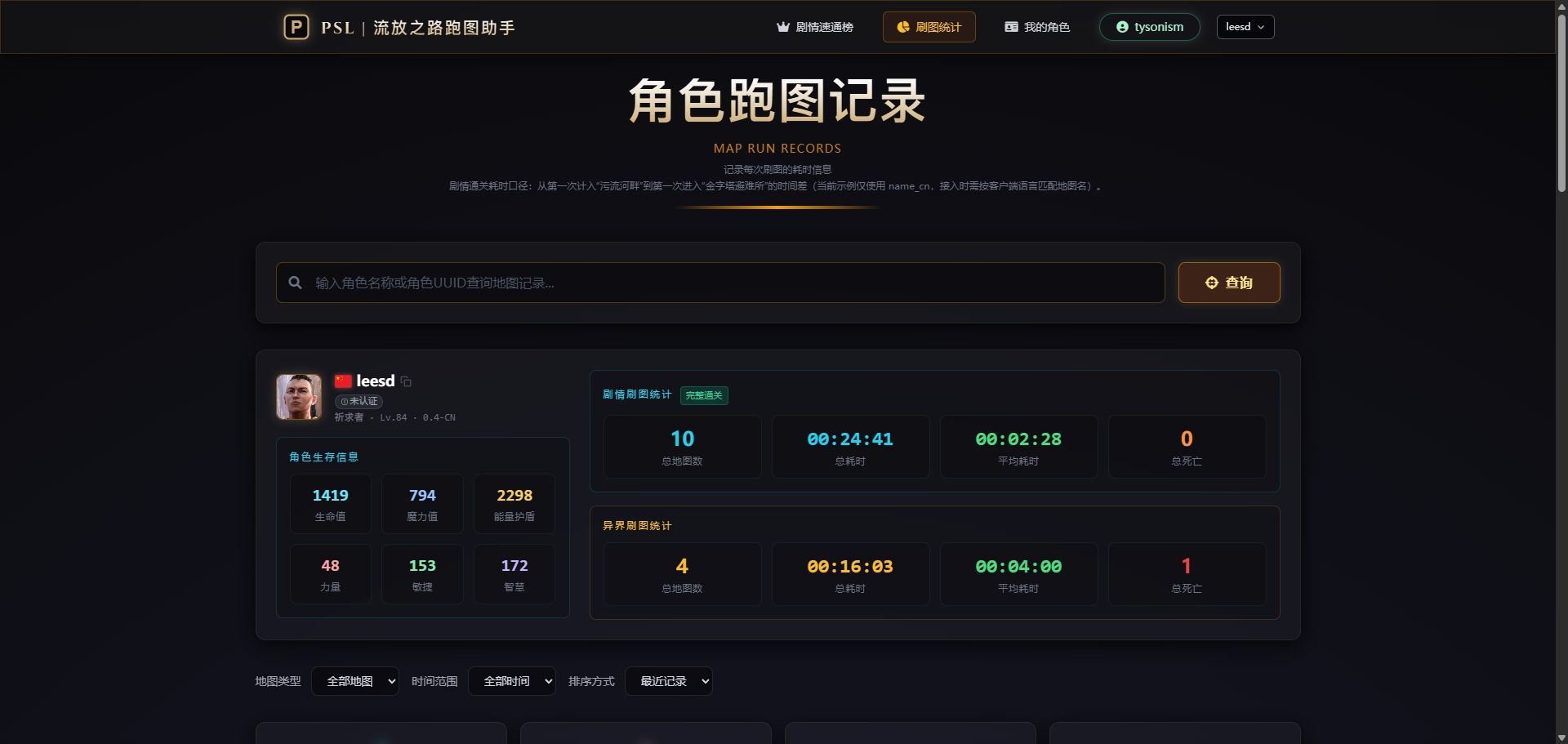
图 2.3 — 刷图统计页面Fig 2.3 — Map Records page
更多工具More Tools
PGT(流放之路攻略翻译助手)PGT (POE Guide Translator)
打开工具Open ToolPGT 是面向 POE 玩家的一键攻略翻译助手,适合阅读 Ninja、Maxroll、POBB、Mobalytics 等英文攻略网站时使用,可快速把关键内容翻译成中文。
PGT is a one-click guide translation assistant for POE players, useful when reading English guide sites such as Ninja, Maxroll, POBB, and Mobalytics.
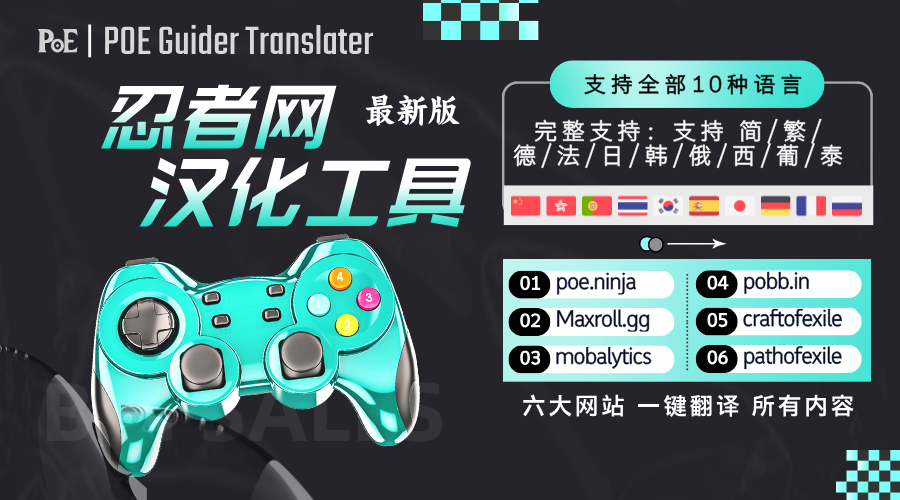
图 2.4 — PGT 流放之路攻略翻译助手Fig 2.4 — PGT POE Guide Translator
常见问题 (FAQ)FAQ
软件是否免费?Is the software free?
无法识别日志路径怎么办?What if the log path isn't detected?
程序会自动尝试在默认文档路径下查找。如果未找到,请点击界面上的"设置日志路径"按钮,手动选择 Client.txt 文件。
The program will try to find it in the default documents path. If not found, click "Set Log Path" button and manually select the Client.txt file.
常见路径参考:Common paths:
G:\POE2\logs\Client.txt
F:\WeGameApps\rail_apps\流放之路:降临(2002052)\logs\Client.txt
Documents\My Games\Path of Exile 2\logs\Client.txt
如何完成角色认证?How do I verify my character?
刷图数据如何上传到排行榜?How does map data upload to the leaderboard?
支持国际服吗?Does it support the international server?
更新日志Changelog
v3.0.4
- 修复Fixed修复已识别国服角色在并行赛季下显示“待确认”的问题Fixed known CN characters incorrectly showing as pending during parallel seasons
v3.0.3
- 优化Improved优化并行赛季角色识别,角色资料与海报会按实际赛季显示Improved parallel-season identification so character details and posters show the correct season
- 优化Improved绑定角色后会同步角色资料;新赛季模式待确认时会清楚提示Character details now sync after binding and clearly show when a new season mode awaits confirmation
v3.0.2
- 修复Fixed修正角色资料与通关海报中的智慧、敏捷显示顺序Corrected Intelligence and Dexterity order in character details and campaign posters
- 优化Improved补齐灵魂行者职业与升华形象,并完善国服赛季和模式识别Completed Spirit Walker artwork and improved CN season and mode recognition
v3.0.1
- 优化Improved通关海报的赛季信息更紧凑,完整保留赛季、区服和模式Campaign poster season details are more compact while retaining season, realm, and mode
v3.0.0
- 新增New新增本地通关海报:完成剧情后可预览并保存 PNG,展示角色资料、赛季、职业升华与章节耗时Added local campaign posters with PNG export, character details, season, class, ascendancy, and chapter times
- 优化Improved海报预览自动完整适配窗口;分享平台与通关海报入口更清晰Poster previews now fit the full window automatically, with clearer Share Platform and Campaign Poster access
v2.37.10
- 界面UI极简剧情计时器的底部大字固定显示累计总耗时;当前章节会提示自动结算条件,间歇章节明确提示金字塔避难所终点The Minimal Story Timer now always shows total elapsed time and explains the active chapter's completion condition
v2.37.9
- 界面UI功能菜单优化为更清晰的操作名称,并为剧情计时、更新、反馈与攻略模板功能补充图标The feature menu now has clearer labels and icons for the story timer, updates, feedback, and guide templates
v2.37.8
- 修复Fixed极简计时器现会按角色独立保存进度,切换角色不会沿用其他角色的章节计时The Minimal Timer now keeps chapter progress separate for each character
v2.37.7
- 修复Fixed从屏幕边缘展开极简计时器时,窗口会自动保持在当前屏幕内The Minimal Timer now stays within the current screen when expanded from an edge
- 界面UI总计时的小数部分更小,收起窗口更紧凑The total timer fraction is smaller and the collapsed overlay is more compact
v2.37.6
- 修复Fixed修复已识别剧情地图未进入章节计时的问题Fixed recognized story areas not starting chapter timing
v2.37.5
- 修复Fixed隐藏主程序后关闭极简计时器,会自动重新打开主程序窗口Closing the Minimal Timer after hiding the main app now automatically restores the main window
v2.37.4
- 界面UI极简计时器固定显示时、分、秒和百分秒,数字切换不再导致总计时位置抖动The Minimal Timer now always shows hours, minutes, seconds, and centiseconds without number-position jitter
v2.37.3
- 界面UI开始、暂停与继续控制改为总计时左侧图标,并支持在识别章节前手动开始Start, pause, and resume controls now use an icon beside the total time and can start before a chapter is recognized
- 修复Fixed修复收起、拖动后展开时章节行出现多余边框的问题Fixed extra borders appearing on chapter rows after collapsing, dragging, and expanding
v2.37.2
- 界面UI收起的极简计时器预留三位小时显示空间,计时超过 24 小时仍保持相同字号The collapsed Minimal Timer reserves space for three-digit hours and keeps the same text size after 24 hours
v2.37.1
- 界面UI极简计时器收起后仅显示单行数字计时,可在窗口内非按钮区域直接拖动The collapsed Minimal Timer now shows only one time row and can be dragged from any non-button area
- 新增New新增开始、暂停与继续控制;手动暂停不会被地图切换自动恢复Added Start, Pause, and Resume controls; manual pauses are not overridden by map changes
v2.37.0
- 新增New新增极简计时器:根据剧情章节自动记录各章节用时,间歇章节会合并统计Added Minimal Timer: automatically records story chapter times and combines intermission parts
- 界面UI透明悬浮窗支持拖动、折叠、隐藏 / 打开主程序与确认重置The transparent overlay supports dragging, collapsing, showing / hiding the main app, and confirmed reset
v2.36.0
- 新增New新增 BD 推荐:可按职业 / 升华筛选构筑,查看点赞、下载数量与本地下载状态Added Build Recommendations: filter by class / ascendancy and view likes, downloads, and local download status
- 新增New支持一键下载到游戏 BD 规划器目录,并可直接打开本地目录Added one-click downloads to the game Build Planner folder and direct local-folder access
- 新增New登录用户可点赞和分享 BD 构筑;符合要求的分享会自动发布Signed-in users can like and share builds; valid shares are published automatically
v2.28.3
- 优化Improved客户端更新会检查当前可用版本,并在有新版本时打开统一下载页面The client now checks the current available version and opens the unified download page when an update is available
v2.28.2
- 新增New下载入口会自动提供当前可用的最新客户端版本The download entry now automatically provides the latest available client version
- 新增New适配 0.5.5 临时赛季与 0.5 赛季并行,国际服和国服赛季可独立生效Added support for parallel 0.5.5 event and 0.5 seasons with independent international and CN schedules
- 修复Fix修复部分 Windows 电脑上客户端启动时出现的运行库加载错误Fixed a runtime loading error that prevented the client from starting on some Windows PCs
v2.22.5
- 新增New新增攻略模板功能:支持导入本地模板,也可切换在线官方模板Added guide templates: import local templates or switch to official online templates
- 新增New角色卡片增加生命、魔力、护盾与属性信息,查看角色状态更直观Character cards now show life, mana, energy shield, and attribute details
- 界面UI地图标题、地图标签、攻略步骤、地图内容与相连地图显示更紧凑清晰Improved map title, map tags, guide steps, map content, and linked map display
- 界面UIHB 悬浮窗布局优化,按钮菜单更集中,减少全屏游戏时的遮挡Improved HB overlay layout with cleaner menus and less obstruction in fullscreen play
- 修复Fix优化客户端稳定性,异常会自动记录到日志,减少无提示退出带来的排查困难Improved client stability and automatic diagnostic logging for unexpected exits
- 修复Fix修复后台攻略模板删除失败的问题,模板管理操作更稳定Fixed guide template deletion in the admin panel for more reliable template management
v2.11.5
- 新增New新增地图点评:登录后可发布公开或私密点评,公开点评审核后展示,支持点赞Added map reviews: post public or private reviews after login, public reviews appear after moderation and support likes
- 新增New新增刷图时间线:客户端可查看服务器历史记录,显示进入时间、地图名、耗时与死亡数Added map timeline: the client can view server-side history with entry time, map name, duration, and deaths
- 新增New新增推荐 BD 与地图点评入口占位,HB 左侧按钮区同步支持常用快捷操作Added build recommendation and map review entry points; HB left action bar now supports common quick actions
- 界面UIVB 主界面、角色卡片、地图内容、快捷键设置与点评窗口布局优化Improved VB main UI, character card, map content, hotkey settings, and review dialog layout
- 界面UIHB 左侧按钮改为更紧凑的两列布局,优化拖拽、关闭、语言、绑定、反馈与更新按钮HB left buttons now use a more compact two-column layout with improved drag, close, language, bind, feedback, and update actions
- 修复Fix修复 HB 打包版任务栏图标、置顶状态与拖拽边界表现Fixed HB packaged taskbar icon, always-on-top behavior, and drag boundary handling
- 修复Fix优化角色绑定与服务器时间线获取,减少新角色显示旧记录或本地查不到历史记录的问题Improved character binding and server timeline fetching to reduce stale records and missing history for newly bound characters
- 修复Fix登录与切换账号体验优化,已登录账号可明确退出后重新登录Improved login and account switching; logged-in users can explicitly log out before signing in again
v2.4.7
- 修复Fix新绑定角色会立即出现在客户端角色列表中,未切换地图也可以直接切回新角色Newly bound characters now appear in the client list immediately, even before changing maps
- 修复Fix角色认证同步更及时,减少重复弹出“完成角色认证”的情况Character verification sync is more timely, reducing repeated verification messages
- 修复Fix同名角色、不同账号或不同区服时,角色归属显示更加准确Character ownership is clearer when names overlap across accounts or realms
- 新增New排行榜与刷图统计增加区服和模式标识,更容易区分国服/国际服、剧情/异界记录Leaderboards and map stats now show clearer realm and mode labels
- 界面UI角色绑定与认证提示更清楚,方便确认当前数据属于哪个账号和角色Binding and verification prompts are clearer, making account and character ownership easier to confirm
- 界面UI地图统计页筛选、模式徽标和英文说明显示更完整Map stats filters, mode badges, and English copy are more complete
- 修复Fix角色属性、区服和模式识别更稳定,WeGame 角色刷新更可靠Character attributes, realm, and mode detection are more stable, with more reliable WeGame refresh
- 修复Fix横版英文启动界面的图标显示异常已修复Fixed icon display on the English startup screen in HB mode
v2.3.96
- 新增New客户端软件多语言支持:界面支持中文 / English 切换,点击左侧语言按钮即可Client multilingual support: UI supports Chinese / English, click the language button on the left
- 新增New排行榜网站全面多语言支持:速通榜、刷图统计、角色档案、登录注册、条款页均支持中 / 英文切换Full i18n for leaderboard website: Speedrun, Map Stats, Profile, Login/Register, Terms pages all support CN/EN
- 界面UI所有页面导航栏右侧新增中 / 英语言切换按钮,语言偏好自动保存All pages now have CN / EN language toggle in navbar, preference auto-saved
v2.3.85
- 新增New剧情速通自动计时:从第一张地图到通关全程自动记录,完成后上报速通榜Story speedrun auto-timer: Records from first map to completion, reports to leaderboard
- 新增New角色认证:游戏中死亡或升级时自动完成认证,排行榜显示认证徽标Character verification: Auto-verified on death/level-up, shows badge in leaderboard
- 新增New角色六维属性展示:自动获取生命/魔力/护盾/力量/敏捷/智慧Six attribute display: Auto-fetches HP/MP/ES/STR/DEX/INT
- 新增New关闭软件时自动保存当前地图记录并上传Auto-save and upload current map record on close
- 新增New刷图数据上传更及时,切图后几乎实时同步More timely data upload, near real-time sync after map change
- 新增New国服死亡检测与升级检测,支持中文日志格式CN server death/level detection, supports Chinese log format
- 修复Fix同一次死亡不再重复计数Same death no longer counted multiple times
- 修复Fix死亡后复活不再丢失当前地图的死亡记录Death record no longer lost after respawn
- 界面UI竖版全新深色金色主题New dark gold theme for VB mode
- 界面UI角色下拉框显示认证标记,当前角色高亮Character dropdown shows verification badge, current char highlighted
- 界面UI启动时弹窗不再堆叠,已登录切换账号需确认No more stacked popups on startup, confirm when switching accounts
- 界面UI横版底部布局优化:角色信息改为弹出菜单,状态栏更紧凑HB bottom layout optimized: Character info as popup menu, more compact status bar
排行榜网站更新Leaderboard Website Update
- 新增New进度榜:按剧情进度分类展示(完整通关 / 进行中 / 异界 / 不完整)Progress board: Shows by story progress (Complete / In Progress / Endgame / Incomplete)
- 新增New角色档案页:查看所有角色的刷图汇总与进度状态Profile page: View all characters' map summary and progress status
- 新增New刷图统计页:剧情与异界分开统计,支持分页浏览详细记录Map Stats page: Story/Endgame separate stats, paginated detailed records
- 新增New角色认证徽标在排行榜中展示Verification badge shown in leaderboard
- 新增New登录后可切换多个角色查看各自数据Switch between multiple characters after login
- 界面UI角色卡片显示国旗、职业头像、赛季标识Character cards show country flag, class avatar, season badge
- 界面UI导航栏新增"我的角色"入口"My Characters" link added to navbar
- 优化Opt短时间记录(如传送点中转)不计入统计Short records (waypoint transitions) not counted
- 优化Opt国旗与地区信息显示更准确More accurate country/region display
v2.3.11 ~ v2.3.19
- 新增NewPSL 排行榜系统上线,支持速通榜与赛季排名PSL leaderboard system launched with speedrun and season rankings
- 新增New账号注册与登录(支持密码、邮箱验证码、短信验证码)Account registration and login (password, email code, SMS code)
- 新增New刷图数据自动上传至排行榜Map data auto-upload to leaderboard
- 新增New支持国际服与国服双区服,数据独立Supports INTL and CN servers with independent data
- 新增New职业图标自动同步更新Class icons auto-sync
- 界面UI竖版按钮配色优化VB button color optimization
- 界面UI登录/注册页面深色主题适配Dark theme for login/register pages
- 修复Fix登录支持账号名、邮箱、手机号统一匹配Login supports username, email, phone unified matching
v2.3.10 及更早v2.3.10 and earlier
- 功能Feat地图攻略自动显示,进入地图即可查看 BOSS、奖励与路线Auto map guide display, shows boss, rewards and routes on entry
- 功能Feat游戏日志自动识别,也可手动选择路径Auto game log detection, manual path selection available
- 功能FeatWeGame / poe.ninja 角色信息同步WeGame / poe.ninja character sync
- 功能Feat自动计时与地图耗时统计Auto timer and map time tracking
- 功能FeatIP 归属地查询与隐私保护IP region lookup with privacy protection
- 界面UI横版(HB)悬浮窗模式,鼠标穿透不挡操作HB overlay mode with click-through
- 界面UI竖版(VB)路线图查看,左右切换VB route map with left/right navigation
- 界面UI区域内容与相连地图展示Area content and connected maps display